Kid-safe tech toys tested to ASTM F963 · CPSIA · EN71 · FCC — trusted by leading US retailers
0%

Choosing a Children Drawing Tablet is no longer a simple screen-size decision. Global buyers now compare pressure sensitivity, stylus accuracy, battery life, repair access, privacy controls, and age suitability. Small details matter. A comfortable grip can keep a child drawing longer. A weak charging port can quickly turn a promising device into household waste.

The Common Sense Census: Media Use by Kids Zero to Eight, published in 2020, reported that 42% of American children aged eight or younger owned a tablet. That figure shows strong household adoption, but ownership does not prove educational value. UNESCO’s 2023 Global Education Monitoring Report also warned that technology works best when it supports teaching and active participation. Passive screen time remains a concern.

Developmental psychologist Alison Gopnik describes children as “the research and development department of the human species.” Her observation helps frame this guide. A suitable Children Drawing Tablet should invite experimentation, not merely display colorful apps. It should tolerate dropped pencils, messy hands, and repeated erasing. For international buyers, regional warranty coverage, language support, charging standards, and data practices deserve equal attention. These factors are easy to overlook.

No ranking is perfect. Children draw differently.

This Top 10 comparison combines practical product testing principles with evidence from education and child-development research. It examines creative control, durability, safety features, portability, and value across different budgets. Some tablets may excel at sketching but disappoint during travel. Others may offer excellent parental controls while limiting artistic flexibility. That trade-off deserves honest consideration before purchase.
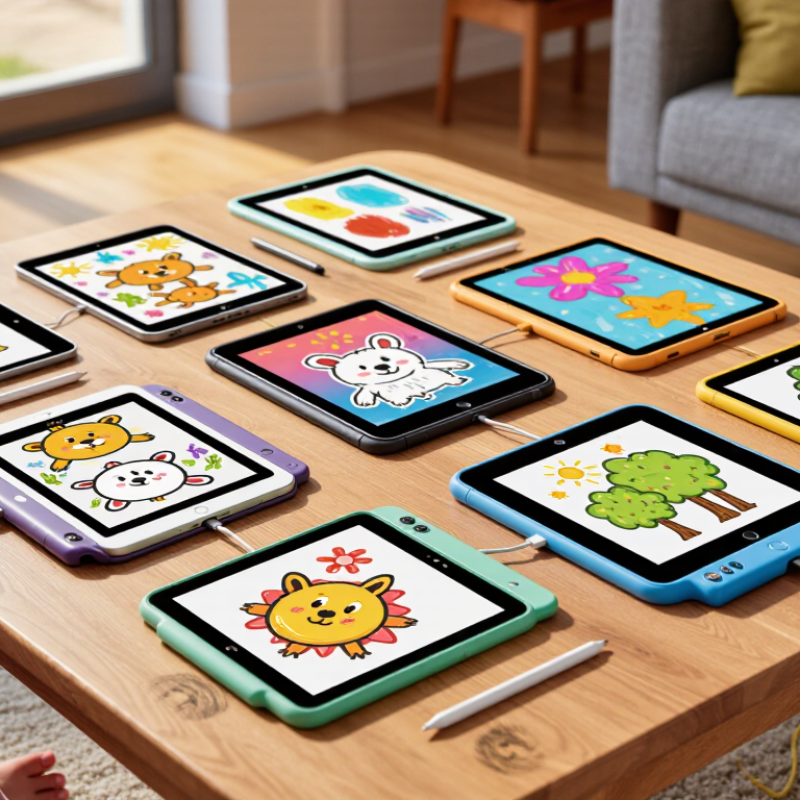
Top 10 Children Drawing Tablets for Global Buyers

What Children’s Drawing Tablets Are and How They Work

Children’s drawing tablets convert hand movements into digital lines. A stylus touches the surface, and sensors track its position. Pressure-sensitive models also measure how firmly a child presses. Light pressure creates thin strokes. Stronger pressure produces darker or wider marks.

Some tablets include a built-in screen. Children can draw directly over visible lines, which feels close to using paper. Other models have blank surfaces and show the artwork on a computer or tablet. Many connect through USB, while wireless versions may use Bluetooth. Compatibility matters. Check the operating system, required software, charging method, and stylus type before buying.

Tips: Test the writing area with a child’s natural grip. Look for rounded edges, a comfortable pen, and simple controls. A bright screen can attract attention, but excessive brightness may cause tired eyes. Set breaks, even when the child resists.

From practical use, pressure sensitivity is helpful for shading, but it is not essential for younger beginners. Low-latency writing feels smoother, although small delays may remain. No device feels exactly like paper. Some children may lose interest after the first week. Others create detailed scenes for hours. Storage, parental guidance, and durable construction often matter more than advanced features. Check warranty terms and local charging requirements carefully.

Key Features to Compare Before Choosing a Drawing Tablet

Top 10 Children Drawing Tablets for Global Buyers

Key Features to Compare Before Choosing a Drawing Tablet

Choosing a children’s drawing tablet requires more than comparing screen size or price. Pressure sensitivity helps the stylus create thin and thick lines naturally. For younger users, moderate sensitivity is usually enough. Extremely high sensitivity may add cost without improving daily sketches. A bright, matte display can reduce glare near windows. Check viewing angles carefully. Colors should remain clear from different positions.

Screen size affects comfort and portability. A smaller tablet fits easily into a school bag, while a larger display gives children more room for characters and scenery. Low pen latency makes strokes appear quickly, which supports better hand-eye coordination. Parallax also matters. The line should appear close to the pen tip. Otherwise, children may need extra practice. Battery-free styluses are convenient because they avoid charging interruptions.

Parents should examine durability, simple controls, and accidental-touch rejection. A protective case may prevent damage from crowded desks or short drops, but no case makes a tablet unbreakable. I once underestimated cable quality; a loose connection quickly became frustrating. Confirm operating-system compatibility before purchasing, especially for international use. Privacy settings deserve attention when the tablet connects to online services. Finally, review warranty coverage, replacement accessories, language support, and local repair options. These details often matter more than colorful features.

Top 10 Children Drawing Tablets for Global Buyers

Key features to compare include display size, pressure sensitivity, battery endurance, weight, and child-safety controls. The weighted score below uses a 100-point evaluation model designed for children’s drawing needs.

Higher scores indicate a stronger overall balance of drawing comfort, portability, durability, battery performance, and parental suitability. Buyers should also confirm regional warranty coverage, charging standards, language support, and age-appropriate safety features before purchase.

Top 10 Children’s Drawing Tablets for Global Buyers

Choosing among the top 10 children’s drawing tablets for global buyers requires more than comparing screen size and price. A useful tablet should match a child’s age, hand strength, and drawing habits. Younger children may prefer a simple pressure-free writing surface with one-button erasing. Older children often need pressure sensitivity, palm rejection, and a responsive stylus. A clear 8-to-12-inch display can make small details easier to control. However, larger screens may feel heavy during travel. That trade-off is easy to overlook.

During evaluation, check the stylus grip, erase function, charging port, and storage options. The pen should feel comfortable after ten minutes of continuous drawing. Look for rounded edges and a stable base, especially for children who draw quickly. Battery life matters for school trips, while a replaceable nib can reduce long-term waste. Global buyers should also confirm language settings, plug compatibility, warranty terms, and safety documentation for their region. Do not trust every advertised feature. Some pens claim high precision but feel delayed in actual use.

Tips: Let the child test the tablet before buying when possible. Try writing circles, thin lines, and quick zigzags. Check whether the screen shows fingerprints easily. Keep brightness moderate to reduce eye discomfort. A screen protector may help, but it can make the pen feel less natural. No tablet is perfect. The best choice balances creative freedom, durability, repair support, and a child’s real daily routine.

Regional Buying Factors: Safety, Languages, Pricing, and Compatibility

Top 10 Children Drawing Tablets for Global Buyers

Regional buying factors can change a child’s drawing experience more than screen size. In my product checks, rounded edges, low-heat surfaces, and pressure-sensitive pens matter for small hands. Children notice comfort. Look for clear age guidance, durable materials, and verified safety information from the seller. Avoid assuming one safety label applies everywhere. Local requirements differ.

Language support deserves equal attention. Menus should offer the child’s preferred language, not only the buyer’s language. Check handwriting recognition, parental controls, help files, and keyboard layouts. Some tablets translate menus poorly. That can confuse younger users. Compatibility also needs careful testing. Confirm support for the child’s operating system, charging standard, drawing software, and available connection ports. A familiar cable may still fail.

Tips: Compare the full regional cost, including tax, delivery, replacement pens, batteries, and warranty service. Test whether local customer support responds clearly. A lower price may hide expensive accessories. Also check screen brightness in a classroom and glare near a window. I would not trust a perfect product page alone. Read recent regional reviews, especially from parents. Small details matter. Before ordering, confirm return conditions and whether software downloads work in your country.

How to Select the Right Tablet for Different Ages and Skills

Top 10 Children Drawing Tablets for Global Buyers

How to Select the Right Tablet for Different Ages and Skills

Age should guide the tablet more than screen size. For children under five, choose a simple, pressure-light model with large controls and no distracting applications. The World Health Organization recommends no sedentary screen time for infants and no more than one hour daily for children aged two to four. A drawing tablet should support short, supervised sessions.

For ages five to seven, prioritize a durable surface, palm rejection, and a thick stylus that is easy to grip. A 2020 Common Sense Census reported that children aged zero to eight spent about two hours and 24 minutes daily with screen media in the United States. That figure is not a target. It is a warning to select tools that encourage creation, not passive scrolling. Children aged eight and above may benefit from pressure sensitivity, layered drawing apps, and a larger active area. However, advanced functions can frustrate beginners.

For global buyers, check language support, charging standards, replacement parts, and parental controls. UNESCO’s 2023 Global Education Monitoring Report found that technology’s learning benefits depend heavily on teaching quality and context. That matters at home, too. A tablet cannot replace feedback from an adult. I have found that children often value a responsive pen more than impressive specifications. Still, “educational” claims deserve careful testing. A bright display may look attractive, yet poor ergonomics can cause tired hands after ten minutes. Budget for a protective case, but do not assume the most expensive option suits every learner.

Top 10 Children Drawing Tablets for Global Buyers - How to Select the Right Tablet for Different Ages and Skills

Rank Tablet Profile Recommended Age Display and Drawing Area Stylus and Input Battery and Charging Durability Features Best For
1 Basic LCD Writing Tablet 3–6 years 8.5–10.5-inch monochrome LCD writing surface; no backlight Pressure-sensitive plastic stylus; no software or pressure-level settings Coin-cell battery commonly supports approximately 6–12 months; usually includes a one-button erase function Lightweight plastic body; recessed or tethered stylus storage is preferable First drawing practice, tracing, letters, numbers, and travel use
2 Color LCD Drawing Tablet 4–8 years 8–12-inch color LCD screen; suitable for simple digital painting and coloring Low-pressure stylus or finger input; pressure sensitivity varies by model Rechargeable battery typically provides about 4–8 hours of active use; USB charging is common Rounded corners, screen protector, and a protective case are recommended Color recognition, free drawing, and short supervised creative sessions
3 Entry-Level Wireless Pen Tablet 6–10 years Approx. 6 × 4-inch active area; requires a computer, tablet, or compatible phone Battery-free electromagnetic stylus; commonly offers 4,096 pressure levels Wireless connection may last approximately 10–20 hours per charge; wired USB operation is usually available Replaceable pen nibs, compact body, and textured drawing surface Learning digital drawing while viewing the image on a separate screen
4 Small Standalone Drawing Tablet 6–10 years 8–9-inch touch display with built-in operating system and drawing applications Active pen support; pressure sensitivity depends on the installed pen and application Typically 6–10 hours of mixed use; USB-C charging is widely used Use with a shock-resistant case and tempered-glass screen protector Portable drawing, educational apps, and independent practice with parental controls
5 Medium Pen Tablet with Shortcut Keys 8–12 years Approx. 8 × 5-inch active area; image appears on a connected computer display Battery-free stylus with approximately 8,192 pressure levels and tilt support on compatible software No pen charging required; tablet normally connects through USB Replaceable nibs, durable surface coating, and programmable shortcut buttons Structured lessons, digital illustration, and developing hand–eye coordination
6 Compact Display Pen Tablet 8–12 years 11–13-inch full-HD drawing display; connects to a computer or compatible device Battery-free pressure-sensitive stylus; commonly 8,192 levels with compatible software Powered through USB or a combined USB and display connection; no separate pen battery Anti-glare surface, adjustable stand, replaceable nibs, and protective sleeve Children ready to draw directly on screen and learn professional-style workflows
7 Large Standalone Creative Tablet 9–13 years 10–11-inch touch display with built-in apps and wireless connectivity Active pressure-sensitive stylus; palm rejection is available on many compatible systems Approximately 8–12 hours of typical use; USB-C charging and power management are common Protective case, parental controls, secure screen lock, and optional stylus storage Longer projects, animation basics, photo references, and school assignments
8 Rugged Educational Tablet with Pen Support 7–12 years 8–10-inch touch display designed for drawing, reading, and learning applications Basic active pen or capacitive stylus; pressure sensitivity may be limited or unavailable Usually 7–10 hours of mixed use; USB charging is standard Reinforced corners, textured grip case, and spill-resistant accessories are useful Classrooms, shared family use, and children who need extra physical protection
9 Large Professional-Style Pen Tablet 10–14 years Approx. 10 × 6-inch or larger active area; requires a computer and compatible software Battery-free stylus with about 8,192 pressure levels; tilt support varies by software No pen charging; wired USB connection provides power and data Sturdy base, replaceable nibs, customizable keys, and optional stand Advanced illustration, comics, 3D textures, and serious skill development
10 Large Display Tablet for Advanced Young Artists 12–16 years 15–16-inch full-HD or higher drawing display; designed for detailed on-screen work Battery-free pressure-sensitive pen; approximately 8,192 levels and tilt support are common Typically powered by a computer through USB and display cables; pen does not require charging Anti-glare glass, adjustable stand, replaceable nibs, and a padded carrying case Portfolio work, digital painting, animation, design courses, and transition to professional tools

Note: Specifications are representative market ranges for each tablet category. Actual features, compatibility, battery life, and stylus performance vary by product and software. Always verify operating-system support, parental-control options, warranty coverage, and regional electrical requirements before purchase.

FAQS

How does a children’s drawing tablet work?

A stylus touches the surface, while sensors track its movement. The tablet converts hand movements into digital lines. Pressure-sensitive models create thin or wide strokes.

Should a young beginner use pressure sensitivity?

It can help with shading and darker marks. However, it is not essential for early practice. Simple controls may matter more.

What screen size is practical for children?

An 8-to-12-inch display offers room for small details. Larger screens can feel heavy during travel. That trade-off is easy to miss.

Is a built-in screen better than a blank surface?

A built-in screen lets children draw over visible lines. It feels closer to paper. Blank surfaces show artwork on another device and may require more coordination.

What should parents check before buying?

Check the operating system, software needs, charging method, and stylus type. Confirm language settings, plug compatibility, warranty terms, and safety documents. Details matter.

How can someone test a tablet before purchase?

Let the child hold the stylus for ten minutes. Try circles, thin lines, and quick zigzags. Check comfort, delay, erasing, and surface fingerprints.

How important are comfort and durability?

Rounded edges and a stable base reduce awkward handling. A comfortable pen matters during long drawing sessions. Durable construction may beat advanced features.

Can drawing tablets cause eye or attention problems?

Excessive brightness may cause tired eyes. Keep brightness moderate and schedule regular breaks. Some children lose interest after one week, while others draw for hours. No tablet is perfect.

Conclusion

A Children Drawing Tablet is a digital creative tool designed to help young users draw, write, color, and explore visual ideas through a responsive screen or connected display. This guide explains how these tablets work and highlights the main features buyers should compare, including pressure sensitivity, screen size, durability, battery life, parental controls, storage, ease of use, and compatibility with common devices. It also presents ten practical options for global buyers without focusing on any specific brand.

Because purchasing needs differ by region, the guide considers safety certifications, language support, local pricing, warranty service, charging standards, and software compatibility. It also explains how to choose a suitable tablet for different ages and skill levels, from simple models for beginners to more advanced devices for experienced young artists. By comparing functionality, convenience, safety, and long-term value, parents, educators, and distributors can make more confident decisions for children’s creative learning.

Elara

Elara

Elara is a dedicated marketing professional with a strong understanding of the company’s products, customers, and industry landscape. Through a combination of strategic thinking, market research, and clear communication, Elara helps translate complex product capabilities into practical value for......